The network map that stays true.
An agent inside your network draws every host that answers, your team writes down what each one is for, and the next sweep never overwrites a word of it.
The scan proposes. Your team decides.
A diagram someone drew is out of date the week after. A scanner knows what is there but has nowhere to write who owns it. Infrality keeps both on one board, and keeps them apart.
- Missing is marked, never deleted
- A host that stops answering is drawn dashed with the number of sweeps it has missed. Whether it is gone is yours to say.
- Your names stay yours
- A name a later sweep finds is offered beside the one you typed. A re-scan moves an address, never a node you placed.
- Measured and written, apart
- Address, MAC, vendor, system, open ports and certificate dates on one side; owner, criticality, runbook and notes on the other.
printer-lab
192.168.10.31
Missed the last three sweeps. Still on the board, with its owner and notes, until someone marks it retired.
pve-01
192.168.10.10
Also answers as
pve-01.lyon.northwind.local
reverse DNS · kept beside your name
What the agent asks each host
- ICMP
- ARP
- mDNS
- NetBIOS
- LLMNR
- SNMP
- SSDP
- Reverse DNS
- TLS certificates
- HTTP titles
Ask the board what breaks if it fails.
Cables, services and the controls that protect them live on one board, in three layers: what runs on which machine, what depends on what, which firewall guards which flow. Pick any element and Infrality traces what goes down with it, what is cut off, and who owns each piece.
Read it the way the moment needs.
The same board is a diagram for the whiteboard, a table for the audit, a numbered document for the person on call, and registers for the operations team. Change it in one view and every other one says the same thing.


- Versions
- One version per editing session, kept 90 days. Compare, restore, or name one before a change window and keep it for good.
- Change log
- Who changed which element, when, and from what — a person, a sweep or an import.
- Comments
- Threads on the board or on one element, with mentions that reach only people who can open it.
- Presence
- See who has the board open, their pointer and their selection. Edits merge when each person saves.
- Runbooks
- What to check, what to restart, who to call — in Markdown on the element, encrypted at rest.
- Registers
- IP plan, flow matrix, service catalog and lifecycle dates, read from the board every time.
Start from what you already have.
Drop in the files your infrastructure is already described in. Infrality draws them, matches what it can to hosts already on the board, and shows you the plan before anything changes.
Files are read in your browser. Nothing is uploaded, and Infrality never connects to your cloud, hypervisor or CMDB.
Import from
- Terraform
- CloudFormation
- Pulumi
- AWS, Azure, Google Cloud inventories
- Kubernetes
- Docker Compose
- Ansible
- Proxmox VE
- VMware vSphere
- Hyper-V
- KVM / libvirt
- FortiGate
- pfSense / OPNsense
- MikroTik
- Cisco IOS
- nmap
- NetBox
- GLPI
- Zabbix
- LLDP / CDP
- draw.io
- Mermaid
- nginx · Traefik · HAProxy
- CSV
- and more
Export to
- PNG
- SVG
- Markdown document
- CSV registers
- draw.io
- Mermaid
- Board JSON
A description marked sensitive stays out of every file.
Every client network, one account.
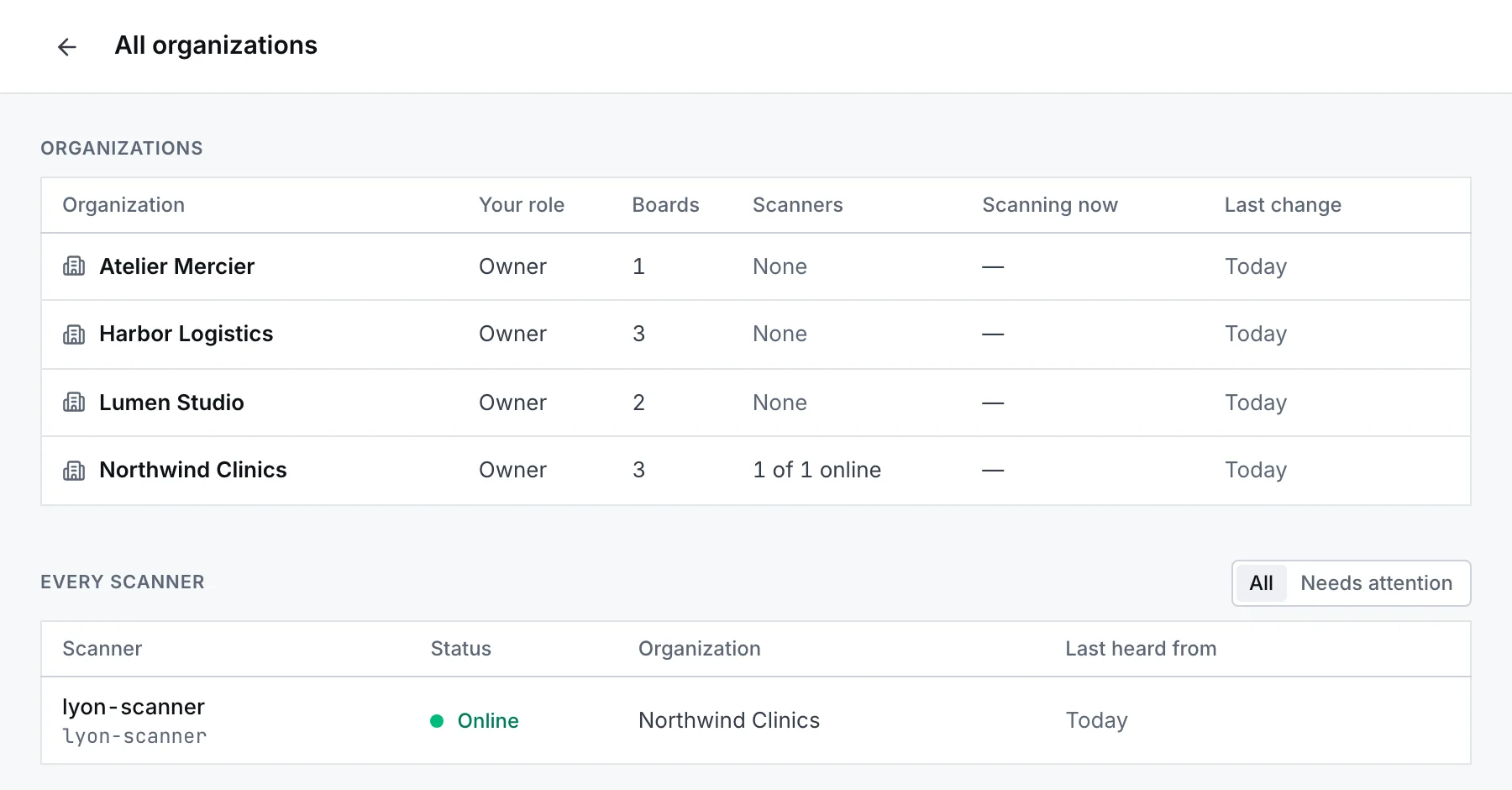
For IT service companies: each client is an organization with its own boards, scanners, members and security policy. One view lists them all, with every scanner and the ones that need attention.
- One organization per client, switched in one click, never mixed in a list.
- Folders for sites; restricted folders for what only some people may open.
- Bring the client's own people in with read, comment or edit — on one board or a whole folder.
Answers for whoever reviews the vendor.
A network map is a list of what to attack. It is kept like one. Read the security page
- Hosting
- In France, on OVHcloud. Data and backups stay in the European Economic Area.
- Encryption
- TLS in transit. Descriptions and runbooks AES-256-GCM at rest. Keys and tokens stored only as hashes.
- Sign-in
- Authenticator apps, security keys, and your own identity provider over OIDC or SAML.
- Provisioning
- SCIM 2.0 from your directory: people and groups arrive and leave with it.
- Policy
- Require MFA, cap session length, allow only your address ranges, for people and for agents.
- Audit
- Every change of access recorded, exported as CSV or JSON, or streamed to a webhook or syslog.
One command on one machine.
Any Linux, macOS or Windows host on the segment will do — a spare mini PC, a VM, a Raspberry Pi. The installer checks a signed release manifest; give the agent a key from the dashboard and it connects out to Infrality, ready to sweep when you ask or on a schedule.
Downloads, checksums and manual install$ curl -fsSL https://www.infrality.io/agent/install.sh | sudo bashQuestions
Something not answered here? Write to us — a person reads every message.
Start with one network.
Create an account, draw or import a board, and put the agent on one machine when you want the map to keep itself current. Every feature is free during the beta.